Hybrid Training Plan Is Now on Apple Watch
Your training plan, on your wrist, with no phone needed. Circuits station by station, strength set by set, and runs with live pace and laps. Everything saves to your plan and Apple Health.
The Hybrid Training Plan app is now on Apple Watch. Your sessions, on your wrist, with no phone in your pocket.
Why a watch app
Hybrid training is awkward on a phone. You are halfway through a set of wall balls, or three kilometres into a tempo run, and the plan is in a pocket, a bag, or a locker. So you guess the next station, or lose count of the rounds, or forget what weight you lifted by the time you sit down to log it.
The watch fixes that. The plan is where you are already looking.
It works without your phone
This was the one rule we built around. The watch app is standalone: once it is linked, it holds the next seven days of your plan on its own. Leave the phone at home for a run, or in the bag at the gym. It does not matter.
When you finish a session, the log goes straight to your plan. If the watch has no connection at that moment, it keeps the log and sends it when it does. Nothing is lost.
What you can do on the watch
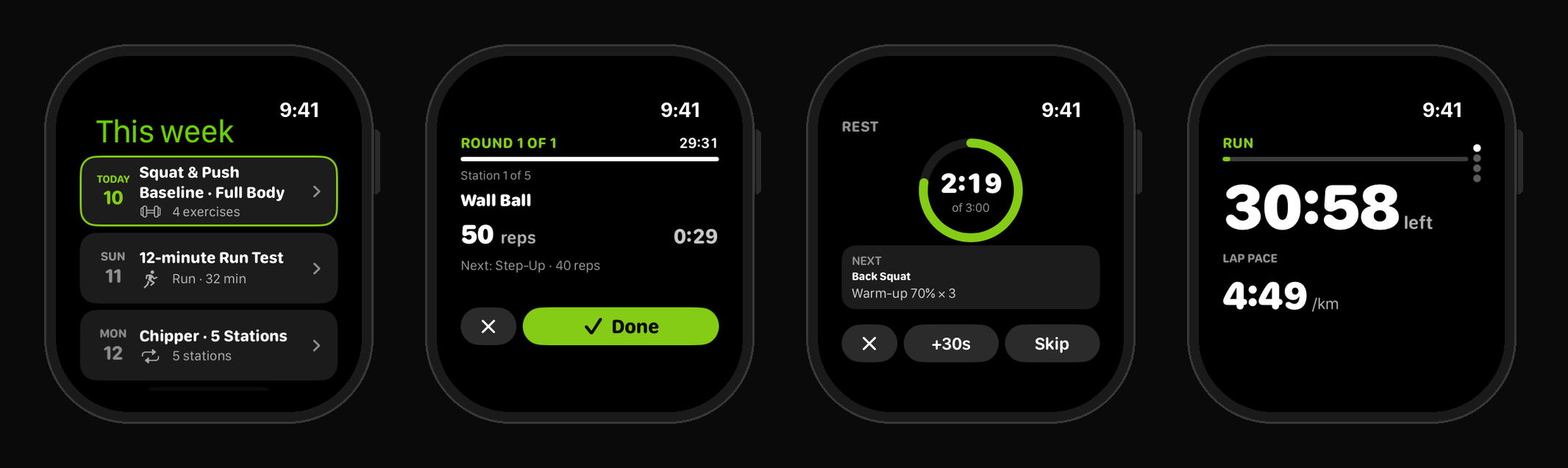
See your week. Open the app and today’s session is at the top, with the rest of the week below it.
Circuits, station by station. Hyrox-style circuits and chippers run one station at a time: what to do, how many reps or metres, what comes next, and the clock for the round. Tap Done and it moves on.
Strength, set by set. Each set shows the target reps and load. Turn the Digital Crown to adjust the weight or reps you actually did, tap Set done, and a rest timer starts with the next set shown underneath. Add 30 seconds or skip it.
Runs with live pace and laps. Runs use the watch’s GPS. Swipe between pages for time left in the step, current pace against target, your totals, and your laps and splits. Planned intervals move from step to step on their own.
Saved everywhere it should be
Every session you finish on the watch:
- is logged against that day in your plan, so your coach sees it at the next review
- is saved to Apple Health as a workout, with your heart rate
- counts towards your fitness score, just like a session logged on your phone
Distances follow the units you chose in the app, kilometres or miles. The watch app is in English, Spanish and German, following your watch’s language.
How to get it
- Update Hybrid Training Plan on your iPhone.
- Install the watch app from the Watch app on your iPhone, or from the App Store on the watch.
- Open the iPhone app once while signed in. The watch links itself.
You need watchOS 10 or later. The watch app comes with your plan, whether you are on the free trial, an adaptive subscription or a one-off plan.
What about Garmin?
We get asked this a lot. Garmin’s developer programme is currently closed to new applicants, so a Garmin app is not something we can build right now. If that changes, we will look at it again.
Get a personalised plan — 30 days free
The plan above is a sample. Get one built specifically around your schedule, experience level, and goals. Free for 30 days in the app. Cancel any time.
Start Your Free Trial →
Paul Kent
Verified AuthorFounder, Hybrid Training Plan
Paul is the founder of Hybrid Training Plan and a competitive hybrid athlete. He combines running, strength training, and Hyrox preparation in his own training, and built this platform to help other athletes balance multiple training goals without the guesswork.